
 Hyundai Santa Fe: Battery. Repair procedures
Removal
| 1. |
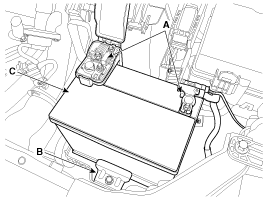
Disconnect the battery (-) terminal and (+) terminal (A).
|
| 2. |
Remove the battery mounting bracket (B) and the insulation pad
and then remove the battery (C).
|
| 3. |
Remove the air cleaner.
<a href="content.asp?vehicletype=Passenger&mfrcode=HY&area=HMA&langcode=ENG&modelid=AN13&modelyr=2013&mmctype=en&mmcid=98&group=SHOP&pdftype=&cat1=2013+%3E+G+2%2E4+GDI&ec=&nLocation=2$8_4_8_1&firstnodedesc=Engine+Mechanical+System&sitinfolist=12%5E1235%5E12350100%5Enone%5E801%5E1%5EENG%5EHY%5EAN13%5E2013%5Een%5E98%5Enone%5Enone%5Enone%5ESHOP%5E%24"
target="_blank">(Refer to Engine Mechanical System - "Air Cleaner")</a>
|
| 4. |
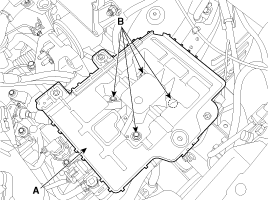
Remove the battery tray (A) after removing the bolts (B).
|
Installation
| 1. |
Install in the reverse order of removal.
|

Vehicle parasitic current inspection
| 1. |
Turn the all electric devices OFF, and then turn the ignition
switch OFF.
|
| 2. |
Close all doors except the engine hood, and then lock all doors.
|
| 3. |
Wait a few minutes until the vehicle’s electrical systems go to
sleep mode.
|
| 4. |
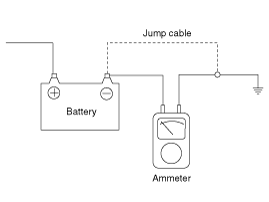
Connect an ammeter in series between the battery (-) terminal
and the ground cable, and then disconnect the clamp from the battery
(-) terminal slowly.
|
| 5. |
Read the current value of the ammeter.
|
Cleaning
| 1. |
Make sure the ignition switch and all accessories are in the OFF
position.
|
| 2. |
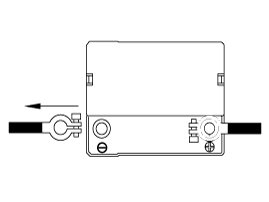
Disconnect the battery cables (negative first).
|
| 3. |
Remove the battery from the vehicle.
|

| 4. |
Inspect the battery tray for damage caused by the loss of electrolyte.
If acid damage is present, it will be necessary to clean the area with
a solution of clean warm water and baking soda. Scrub the area with
a stiff brush and wipe off with a cloth moistened with baking soda and
water.
|
| 5. |
Clean the top of the battery with the same solution as described
above.
|
| 6. |
Inspect the battery case and cover for cracks. If cracks are present,
the battery must be replaced.
|
| 7. |
Clean the battery posts with a suitable battery post tool.
|
| 8. |
Clean the inside surface of the terminal clamps with a suitable
battery cleaning tool. Replace damaged or frayed cables and broken terminal
clamps.
|
| 9. |
Install the battery in the vehicle.
|
| 10. |
Connect the cable terminals to the battery post, making sure tops
of the terminals are flush with the tops of the posts .
|
| 11. |
Tighten the terminal nuts securely.
|
| 12. |
Coat all connections with light mineral grease after tightening.
|
 Battery. Components and Components Location
Components 1. Battery insulation pad 2. Battery 3. Battery tray 4. Battery mounting bracket ...
 Battery. Troubleshooting
Troubleshooting ...
See also:
Engine start/stop button position
OFF White With automatic transaxle To turn off the engine (START/RUN position) or vehicle power (ON position), press the engine start/stop button with the shift lever in the P (Park) position. When you ...
4WD ECU. Flow Diagram
Power Flow Diagram 4WD ECU Input&Output Diagram ...
LCD Modes
❈ For controlling the LCD modes, refer to "LCD Display Control" in this chapter. ❈ For "Trip Computer" mode, refer to "Trip Computer" in this chapter. ...
