
 Hyundai Santa Fe: Rear Console Cover. Repair procedures
Replacement
|

|

| 1. |
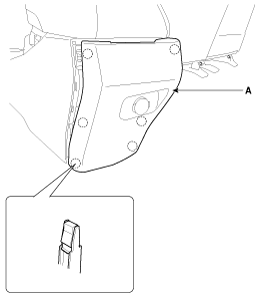
Using a screwdriver or remover, remove the rear console cover
(A).
|
| 2. |
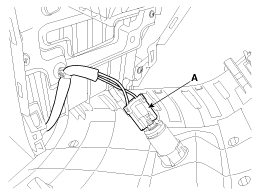
Disconnect the power outlet connector (A).
|
| 3. |
Install in the reverse order of removal.
|
 Rear Console Cover. Components and Components Location
Component Location 1. Rear console cover ...
 Console Armrest. Components and Components Location
Component Location 1. Console armrest ...
See also:
Multimedia Jack. Repair procedures
Removal 1. Disconnect the negative (-) battery terminal. 2. Remove the console front complete assembly (A). 3. Remove the multimedia jack (B) after disconnecting the connector (A) from the console front ...
Variable Intake Solenoid (VIS) Valve. Schematic Diagrams
Circuit Diagram ...
Fuel Sender. Repair procedures
Removal 1. Remove the fuel pump. (Refer to Fuel Delivery System - “Fuel Pump�) 2. Disconnect the fuel sender connector (A). 3. Release the fixing hooks, and then remove the fuel sender (A). Installation ...
