
 Hyundai Santa Fe: Blade replacement
When the wipers no longer clean adequately, the blades may be worn or cracked, and require replacement.
CAUTION
To prevent damage to the wiper arms or other components, do not attempt to move the wipers manually.
CAUTION
The use of a non-specified wiper blade could result in wiper malfunction and failure.
Front windshield wiper blade
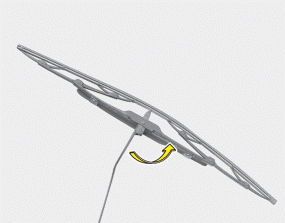
1. Raise the wiper arm and turn the wiper blade assembly to expose the plastic locking clip.
CAUTION
Do not allow the wiper arm to fall against the windshield, since it may chip or crack the windshield.
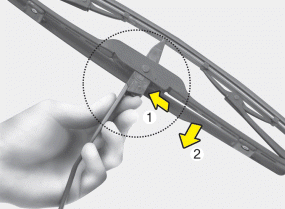
2. Compress the clip and slide the blade assembly downward.
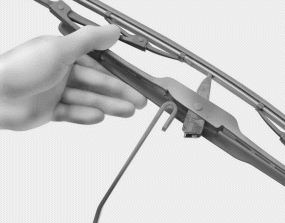
3. Lift it off the arm.
4. Install the blade assembly in the reverse order of removal.
Rear window wiper blade
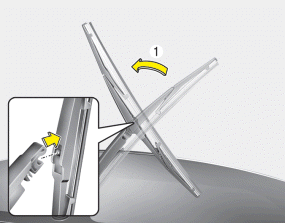
1. Raise the wiper arm and pull out the wiper blade assembly.
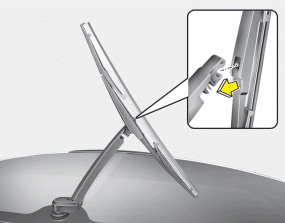
2. Install the new blade assembly by inserting the center part into the slot in the wiper arm until it clicks into place.
3. Make sure the blade assembly is installed firmly by trying to pull it slightly.
To prevent damage to the wiper arms or other components, have an authorized HYUNDAI dealer replace the wiper blade.
 Blade inspection
✽ NOTICE Commercial hot waxes applied by automatic car washes have been known to make the windshield difficult to clean. Contamination of either the windshield or the wiper blades with foreign ...
 Battery
...
See also:
35R Clutch Control Solenoid Valve(35R/C_VFS). Specifications
Specifications Direct control VFS[35R/C] ▷ Control type : Normal high type Control Pressure kpa (kgf/cm², psi) 500.14~9.81 (5.1~0.1,72.54~1.42) Current value(mA) 50~850 Internal resistance(Ω) ...
Special Service Tools
Special Service Tools Tool(Number and Name) Illustration Use 09495-33000 Puller Removal of spider assembly from a drive shaft. 09568-4A000 Ball joint puller Remove the ball joint 09495-3K000 Band installer ...
Emergency Fastening Device (EFD). Description and Operation
Description The Emergency Fastening Device (EFD) operates as well as the belt pretensioner at the same time, if it gets into its deploy condition after a collision. It is located near the anchor on the ...
