
 Hyundai Santa Fe: Operating door locks from outside the vehicle
Using the folding key
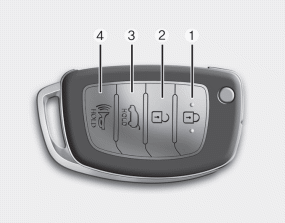
• Doors can be locked and unlocked pressing the lock button(1) and unlock button(2) on the folding key.
Once the doors are unlocked, they may be opened by pulling the door handle. When closing the door, push the door by hand. Make sure that doors are closed securely.
For more detailed information, refer to "Folding key" in this section.
Using the smart key
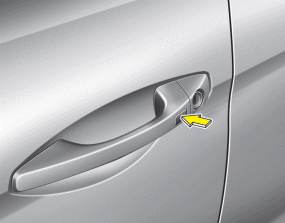
• Doors can be locked and unlocked pressing the button of the outside door handle with the smart key in your possession.
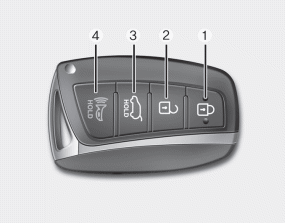
• Doors can be locked and unlocked pressing the lock button(1) and unlock button(2) on the smart key.
Once the doors are unlocked, they may be opened by pulling the door handle. When closing the door, push the door by hand. Make sure that doors are closed securely.
For more detailed information, refer to “Smart key� in this section.
Using the mechanical key in an emergency situation
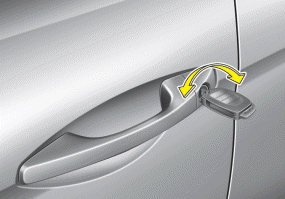
Type A
Type B
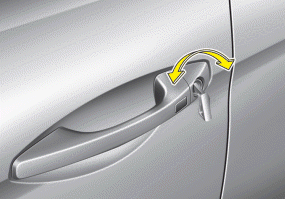
If the smart key or folding key does not operate normally, you can lock or unlock the doors as follows:
1. Unfold the folding key or remove the mechanical key from the smart key.
2. Insert the key into the hole of the outside door handle. Turn the key toward
the front of the vehicle to unlock and toward the rear of the vehicle to lock.
✽ NOTICE
- In cold and wet climates, door locks and door mechanisms may not work properly due to freezing conditions.
- If the door is locked/unlocked multiple times in rapid succession with either the vehicle key or door lock switch, the system may stop operating temporarily in order to protect the circuit and prevent damage to system components.
✽ NOTICE
You can activate or deactivate the Tow Turn Unlock function. Refer to "User Settings" in this section.
WARNING
- If you don't close the door securely, the door may open again.
- Be careful that someone's body and hands are not trapped when closing the door.
 Door locks
...
 Operating door locks from inside the vehicle
With the door lock button To unlock a door, push the door lock button(1) to the “Unlock� position. The red mark (2) on the button will be visible. To lock a door, push the door lock button(1) to the ...
See also:
Injector. Repair procedures
Inspection 1. Turn the ignition switch OFF. 2. Disconnect the injector connector. 3. Measure resistance between the injector terminals 1 and 2. 4. Check that the resistance is within the specification. ...
Components and Components Location
Component Location 1. Radiator 2. Mounting insulator 3. Valve body cover 4. ATF hose&pipe 5. Automatic transaxle 6. Radiator(Automatic transaxle oil cooler) upper mounting bracket 7. Upper mounting ...
Warning lights
✽ NOTICE - Warning lights Make sure that all warning lights are OFF after starting the engine. If any light is still ON, this indicates a situation that needs attention. ...
