
 Hyundai Santa Fe: Tilt steering
A tilt steering wheel allows you to adjust the steering wheel before you drive. You can also raise it to give your legs more room when you exit and enter the vehicle (if equipped).
The steering wheel should be positioned so that it is comfortable for you to drive, while permitting you to see the instrument panel warning lights and gauges.
WARNING - Steering
- Never adjust the angle and height of steering wheel while driving. You may lose your steering control and cause severe personal injury or accidents.
- After adjusting, push the steering wheel both up and down to be certain it is locked in position.
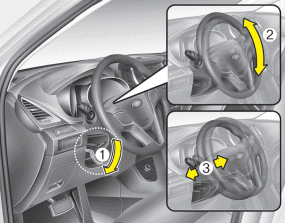
To change the steering wheel angle, pull down the lock release lever (1), adjust the steering wheel to the desired angle (2) and height (if equipped) (3), then pull up the lockrelease lever to lock the steering wheel in place. Be sure to adjust the steering wheel to the desired position before driving.
 Electric power steering (EPS)
The power steering uses a motor to assist you in steering the vehicle. If the engine is off or if the power steering system becomes inoperative, the vehicle may still be steered, but it will require increased ...
 Heated steering wheel
With the ignition switch in the ON position, pressing the heated steering wheel button warms the steering wheel. The indicator on the button will illuminate and notify you on the LCD display. To turn ...
See also:
Hazard warning flasher
Type A Type B The hazard warning flasher should be used whenever you find it necessary to stop the car in a hazardous location. When you must make such an emergency stop, always pull off the road as far ...
Components and Components
Location
Component Location 1. BCM (Body Control Module) 2. Ultrasonic sensor ※ Rear parking assist control unit function is built in BCM (body control unit). ...
Rear window wiper and washer switch
The rear window wiper and washer switch is located at the end of the wiper and washer switch lever. Turn the switch to the desired position to operate the rear wiper and washer. HI : High wiper speed ...
