
 Hyundai Santa Fe: Cargo security screen
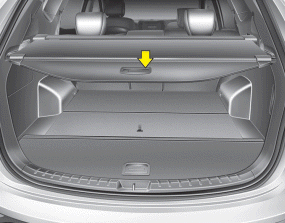
Use the cargo security screen to hide items stored in the cargo area.
- To use the cargo security screen
- To remove the cargo security screen
- To remove the cargo security screen from the luggage tray
- Side curtain
 Luggage net (holder)
Type A Type B To keep items from shifting in the cargo area, you can use the four holders located in the cargo area to attach the luggage net. If necessary, contact your authorized HYUNDAI dealer to obtain ...
 To use the cargo security screen
1. Pull the cargo security screen towards the rear of the vehicle by the handle (1). 2. Insert the guide pin into the guide (2). ✽ NOTICE Pull out the cargo security screen with the handle in the ...
See also:
Electric power steering (EPS)
The power steering uses a motor to assist you in steering the vehicle. If the engine is off or if the power steering system becomes inoperative, the vehicle may still be steered, but it will require increased ...
Illuminated engine start/stop button
Whenever the front door is opened, the engine start/stop button will illuminate for your convenience. The light will go off after about 30 seconds when the door is closed. It will also go off immediately ...
Output Speed Sensor. Specifications
Specifications ▷ Type: Hall effect sensor Operation condition (°C)°F ((-)40~150)) -40~302 Air gap(mm)in. (0.25~0.70) 0.0098~0.0276 Output voltage (V) High 1.18~1.68 Low 0.59~0.84 ...
