
 Hyundai Santa Fe: LCD Display Control
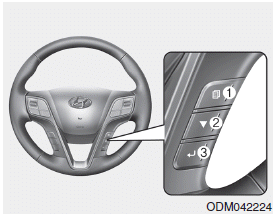
The LCD display modes can be changed by using the control buttons on the steering wheel.
(1)  : MODE button for changing modes
(2)  : MOVE button for changing items
(3)  : SELECT/RESET button for setting
or resetting the selected item
: SELECT/RESET button for setting
or resetting the selected item
❈ For the LCD modes, refer to “LCD Displayâ€� in this chapter.
 Instrument Cluster Control
Adjusting Instrument Cluster Illumination The brightness of the instrument panel illumination is changed by moving the illumination control knob right or left when the ignition switch or Engine Start/Stop ...
 Gauges
Speedometer Type A Type B The speedometer indicates the speed of the vehicle and is calibrated in miles per hour (mph) and/or kilometers per hour (km/h). Tachometer Type A Type B The tachometer indicates ...
See also:
Rear Spoiler. Repair procedures
Replacement • Put on gloves to protect your hands. • When prying with a flat-tip screwdriver, wrap it with protective tape, and apply protective tape around the related parts, to prevent damage. • ...
Compass function
The Compass can be turned ON and OFF and will remember the last state when the ignition is cycled. To turn the display feature ON/OFF: 1. Press and release the button within 1 second to turn the display ...
Air bag warning light
The purpose of air bag warning light in your instrument panel is to alert you of a potential problem with your air bag - Supplemental Restraint System (SRS). When the ignition switch is turned ON, the ...
