
 Hyundai Santa Fe: Multimedia Jack. Repair procedures
Removal
| 1. |
Disconnect the negative (-) battery terminal.
|
| 2. |
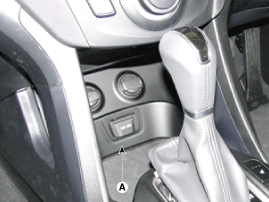
Remove the console front complete assembly (A).
|
| 3. |
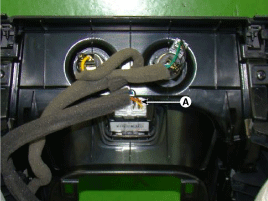
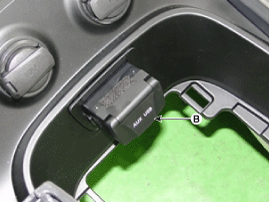
Remove the multimedia jack (B) after disconnecting
the connector (A) from the console front complete assembly.
|
Installation
| 1. |
Install the multimedia jack.
|
| 2. |
Install the console front complete assembly.
|
| 3. |
Connect the negative (-) battery connector.
|
 Multimedia Jack. Description and Operation
Description The multimedia jack on the console upper cover is for customers who like to listen to external portable music players like the MP3, iPod and etc., through the vehicle's sound system when ...
 Speakers. Repair procedures
Inspection 1. Troubleshooting for Speaker (1) Basic inspection of speaker Inspect the sound from speaker after verifying that the speaker mounting screws are removed and the wiring connector is connected ...
See also:
Spark Plug. Description and Operation
Description A spark plug is a device for delivering electric current from an ignition system to the combustion chamber of a spark-ignition engine to ignite the compressed fuel/air mixture therein by means ...
Fuel Filler Cap. Description and Operation
Description A ratchet tightening device on the threaded fuel filler cap reduces the chances of incorrect installation, which would seal the fuel filler. After the gasket on the fuel filler cap and the ...
Economical operation
Your vehicle's fuel economy depends mainly on your style of driving, where you drive and when you drive. Each of these factors affects how many miles (kilometers) you can get from a gallon (liter) ...
