
 Hyundai Santa Fe: Passive Occupant Detection System (PODS-F). Repair procedures
Removal
| 1. |
Disconnect the battery negative cable, and wait for at least three
minutes before beginning work.
|
| 2. |
Remove the front passenger seat assembly.
|
| 3. |
Disconnect the PODS-F ODU connector.
|
| 4. |
Remove the PODS-F ODU.
|
| 1. |
Disconnect the battery negative cable, and wait for at least three
minutes before beginning work.
|
| 2. |
Remove the front passenger seat assembly.
|
| 3. |
Disconnect the PODS-F mat connector.
|
| 4. |
Remove the front seat cushion assembly
|
Компрессор воздушный мембранный: купить мембранныи компрессор www.vac-industry.ru.
Installation
| 1. |
Install the PODS-F ODU on the Front seat track assembly.
|
| 2. |
Connect the PODS-F ODU connector.
|
| 3. |
Install the front passenger seat assembly.
|
| 4. |
Reconnect the battery negative cable.
|
| 5. |
After installing the PODS-F, confirm proper system operation :
|

| 1. |
Install the PODS-F Mat equipped seat cushion assembly on the front
seat assembly.
|
| 2. |
Connect the PODS-F mat connector.
|
| 3. |
Install the front passenger seat assembly.
|
| 4. |
Reconnect the battery negative cable.
|
| 5. |
After installing the PODS-F, confirm proper system operation :
|
PODS-F zeroing Procedure
| - |
Seat assembly, Seat foam and Seat Cushion Assembly Replacement
(PODS-F ODU No Replacement): C1[Auto]
|
| - |
PODS-F ODU Replacement: C2[Manual]:
|
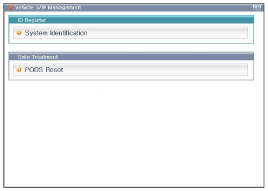
| 1. |
Ignition “OFF”, connect GDS.
|
| 2. |
Ignition “ON” & Engine “OFF”, select Airbag system and “PODS-F
Reset” mode.
|
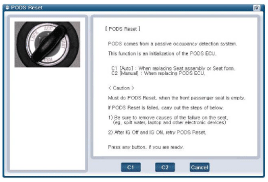
| 3. |
Select C1.
C1[Auto] : When replacing seat assembly or Seat foam.
|
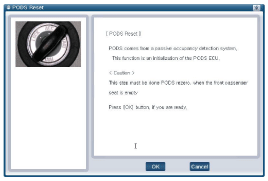
| 4. |
The GDS will show the two PODS-F Zeroing function steps.
|

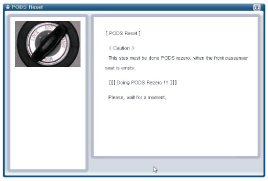
| 5. |
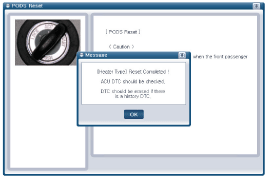
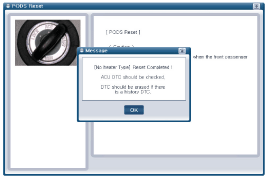
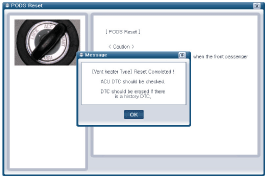
The PODS-F initialization procedure will be performed.
[Heater type]
[No heater type]
[Vent heater type]
|
| 1. |
Ignition “OFF”, connect GDS.
|
| 2. |
Ignition “ON” & Engine “OFF”, select Airbag system and “PODS-F
Reset” mode.
|
| 3. |
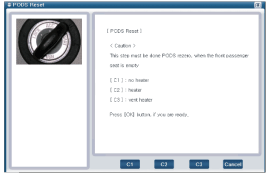
Select C2.
C2[Manual]: When replacing PODS-F ODU
|
| 4. |
Select seat type.
|
| 5. |
The GDS will show the two PODS-F Zeroing function steps.
|
| 6. |
The PODS-F initialization procedure will be performed.
[Heater type]
[No heater type]
[Vent heater type]
|

 Schematic Diagrams
Circuit Diagram (1) Circuit Diagram (2) Circuit Diagram (3) SRSCM Connector terminal Pin Function (Connector A) Pin Function (Connector B) 1 Ignition 1 Seat belt pretensioner [Driver] High 2 Passenger ...
See also:
Knee Airbag (KAB) Module. Repair procedures
Removal 1. Disconnect the battery negative cable and wait for at least three minutes before beginning work. 2. Remove the crash pad lower panel. 3. After loosening the mounting nuts and then remove the ...
Specifications
Specifications Items Bulb Type Bulb Wattage (W) Front Head lamp Low H11 55 High H7 55 Turn signal lamp PY28W 28 Position lamp LED LED Side marker W5W 5 Fog lamp H8 35 Rear Rear combination lmap Turn signal ...
Start/Stop Button. Repair
procedures
Removal 1. Disconnect the negative(-) battery terminal. 2. Remove the driver crash pad lower panel. 3. Disconnect the start/stop button connector (B) after removing the center fascia garnish (A). 4. Remove ...
