
 Hyundai Santa Fe: Rear Seat Assembly. Repair procedures
Replacement
| 1. |
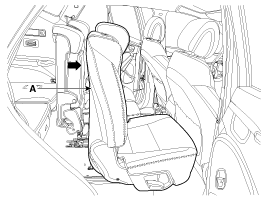
Push the second row seat assembly [RH] (A) towards the front of
the vehicle as far as possible.
|
| 2. |
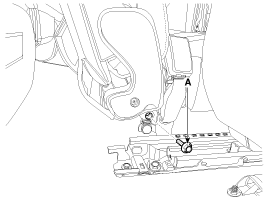
Loosen the second center seat belt buckle mounting bolt (A).
|
| 3. |
Push the second row seat assembly towards the front of the vehicle
as far as possible.
|
| 4. |
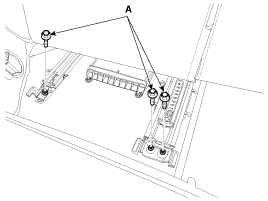
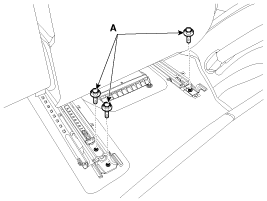
Loosen the second row seat assembly rear mounting bolts (A).
[LH]
[RH]
|
| 5. |
Push the second row seat assembly towards the rear of the vehicle
as far as possible.
|
| 6. |
After loosening the mounting bolts, then remove the second row
seat assembly (A).
|
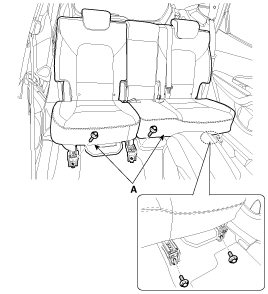
| 7. |
Install in the reverse order of removal.
|
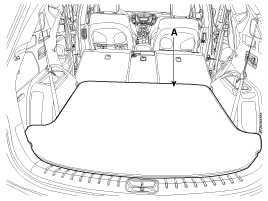
| 1. |
Remove the luggage covering met (A).
|
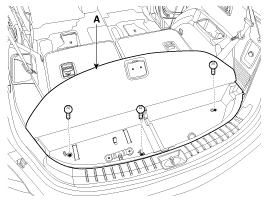
| 2. |
After loosening the mounting screws, then remove the luggage floor
box (A).
|
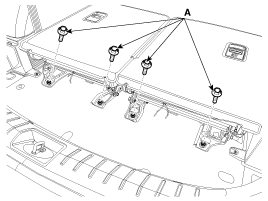
| 3. |
Loosen the third row seat assembly rear mounting bolts (A).
|
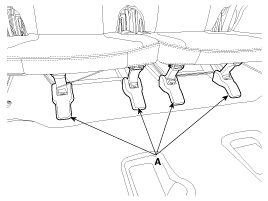
| 4. |
Remove the third row seat track mounting cover (A).
|
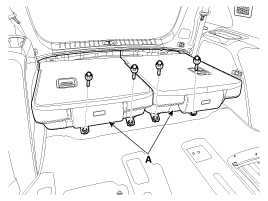
| 5. |
After loosening the mounting bolts, then remove the third row
seat assembly (A).
|
| 6. |
Install in the reverse order of removal.
|
 Rear Seat Assembly. Components and Components Location
Component Location [Second row seat assembly] 1. Second row seat assembly [LH] 2. Second row seat assembly [RH] [Third row seat assembly] 1. Third row seat assembly [LH] 2. Third row seat assembly [RH] ...
 Rear Seat Back Cover. Components and Components Location
Component Location [Second row seat assembly] 1. Rear seat back cover [LH] 2. Rear seat back cover [RH] [Third row seat assembly] 1. Rear seat back cover [LH] 2. Rear seat back cover [RH] ...
See also:
Opening the fuel filler lid
The fuel filler lid must be opened from inside the vehicle by pulling the fuel filler lid opener lever located on the driver’s door. ✽ NOTICE If the fuel filler lid will not open because ice ...
Cruise control system
1.Cruise indicator 2.Cruise set indicator The cruise control system allows you to program the vehicle to maintain a constant speed without depressing the accelerator pedal. This system is designed to ...
Malfunction Indicator Lamp (MIL)
This warning light illuminates: Once you set the ignition switch or Engine Start/Stop Button to the ON position. - It remains on until the engine is started. When there is a malfunction with the emission ...
