
 Hyundai Santa Fe: AVN Head Unit. Repair procedures
Removal
|

| 1. |
Disconnect the negative (-) battery terminal.
|
| 2. |
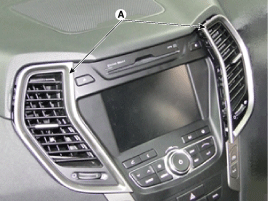
Remove the center air vent duct (A).
|
| 3. |
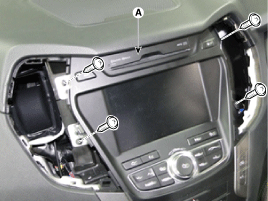
Remove the AVN head unit (A) after loosening the
mounting screws (4EA).
|
| 4. |
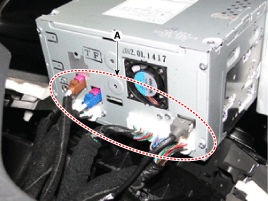
Remove the AVN head unit after disconnecting connectors
and cables (A).
|
Installation
| 1. |
Connect the AVN head unit connectors and cable.
|
| 2. |
Install the AVN head unit.
|
| 3. |
Install the center air vent duct.
|
| 4. |
Connet the negative (-) battery terminal.
|
 AVN Head Unit. Components and Components
Location
AVN Head Unit. Components and Components
Location
Components AVN (A/V & Navigation) Head Unit Connector Connector Pin Information No. Connector A Connector B Connector C 1 - MM CAN High - 2 Parking V VIDEO - (Dimming output) - 3 Parking V GND Parking ...
 Multimedia Jack. Schematic Diagrams
Circuit Diagram ...
See also:
Side Airbag (SAB) Module. Components and Components Location
Components ...
Rear Door Module. Components and Components Location
Component Location 1. Rear door module ...
Components and Components Location
Components 1. Intake camshaft 2. Exhaust camshaft 3. Intake CVVT assembly 4. Exhaust CVVT assembly 5. Timing chain 6. Timing chain guide 7. Timing chain tensioner arm 8. Timing chain tensioner 9. Timing ...
