
 Hyundai Santa Fe: Rear parking assist system
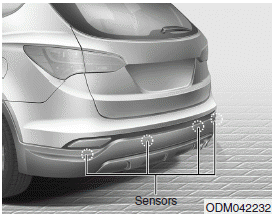
The rear parking assist system assists the driver during backward movement of the vehicle by chiming if any object is sensed within a distance of 47 in. (120 cm) behind the vehicle. This system is a supplemental system and it is not intended to nor does it replace the need for extreme care and attention of the driver. The sensing range and objects detectable by the back sensors are limited. Whenever backingup, pay as much attention to what is behind you as you would in a vehicle without a rear parking assist system.
WARNING
The rear parking assist system is a supplementary function only. The operation of the rear parking assist system can be affected by several factors (including environmental conditions). It is the responsibility of the driver to always check the area behind the vehicle before and while backing up.
- Operation of the rear parking assist system
- Non-operational conditions of rear parking assist system
- Rear parking assist system precautions
 Downhill Brake Control (DBC) Indicator Light
This warning light illuminates: Once you set the ignition switch or Engine Start/Stop Button to the ON position. - It illuminates for approximately 3 seconds and then goes off. When you activate the DBC ...
 Operation of the rear parking assist system
Operating condition This system will activate when the indicator on the rear parking assist OFF button is not illuminated. If you desire to deactivate the rear parking assist system, press the rear parking ...
See also:
Components and Components Location
Components 1. Airbag module 2. Bezel 3. Remote control assembly 4. Steering wheel 5. Wiring 6. Lower cover ...
Front Seat Belt Pretensioner. Components and Components Location
Component Location 1. Front seat belt pretensioner ...
Gasoline containing alcohol and methanol
Gasohol, a mixture of gasoline and ethanol (also known as grain alcohol), and gasoline or gasohol containing methanol (also known as wood alcohol) are being marketed along with or instead of leaded or ...
