
 Hyundai Santa Fe: External Amplifier. Components and Components
Location
Hyundai Santa Fe: External Amplifier. Components and Components
Location
Components
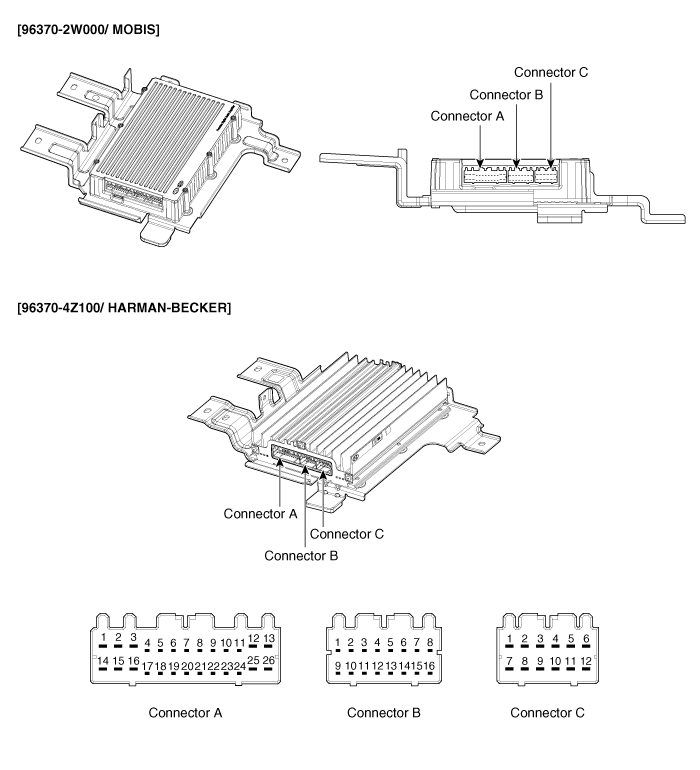
Connector Pin Information
|
No. |
Connector A (26 pin) |
Connector B (16 pin) |
Connector C (12 pin) |
|
1 |
Battery + |
Right surround speaker + |
Rear right door + |
|
2 |
Battery + |
Left surround speaker + |
Rear left door speaker + |
|
3 |
Battery + |
- |
Front right tweeter speaker + |
|
4 |
- |
- |
Front left tweeter speaker + |
|
5 |
CAN + |
- |
Front right door speaker + |
|
6 |
CAN - |
- |
Rear left door speaker + |
|
7 |
ACC |
Front center speaker + |
Rear right door speaker - |
|
8 |
- |
- |
Rear left door speaker - |
|
9 |
- |
Right surround speaker - |
Front right tweeter speaker - |
|
10 |
- |
Left surround speaker - |
Front left tweeter speaker - |
|
11 |
Navigation voice + |
- |
Front right door speaker - |
|
12 |
Subwoofer 2 + |
- |
Rear left door speaker - |
|
13 |
Subwoofer 1 + |
- |
|
|
14 |
Ground |
- |
|
|
15 |
Ground |
Front center speaker - |
|
|
16 |
Ground |
- |
|
|
17 |
- |
|
|
|
18 |
SPDIF + |
||
|
19 |
SPDIF - |
||
|
20 |
SPDIF ground |
||
|
21 |
- |
||
|
22 |
- |
||
|
23 |
- |
||
|
24 |
Navigation voice - |
||
|
25 |
Subwoofer 2 - |
||
|
26 |
Subwoofer 1 - |
 Speakers. Repair procedures
Inspection 1. Troubleshooting for Speaker (1) Basic inspection of speaker Inspect the sound from speaker after verifying that the speaker mounting screws are removed and the wiring connector is connected ...
 External Amplifier. Repair procedures
Removal External Amplifier 1. Remove the passenger seat assembly. 2. Remove the external amplifier (A) after disconnecting the connectors and loosening the mounting bolts (3EA). Installation External Amplifier ...
See also:
Transaxle Control Module (TCM). Description and Operation
Description Transaxle Control Module (TCM) is the automatic transaxle's brain. The module receives and processes signals from various sensors and implements a wide range of transaxle controls to ensure ...
Air bag Warning Light
This warning light illuminates: Once you set the ignition switch or Engine Start/Stop Button to the ON position. - It illuminates for approximately 6 seconds and then goes off. When there is a malfunction ...
Knock Sensor (KS). Schematic Diagrams
Circuit Diagram ...
